
SAP Note này hướng dẫn cách truy vấn dữ liệu để đưa vào template dùng cho import / update thông tin warehouse information (line level) bằng DTW
Symptom
How to add or update WarehouseInfo to Items in SAP Business One via Data Transfer Workbench (DTW) or Data Interface (DI API).
You import WarehouseInfo to Items into SAP Business One via Data Transfer Workbench and you receive one of the following error messages:
“This entry already exists in the following tables (ODBC -2035)” OR
“Runtime Error! R6025 – pure virtual function call”
Cause
Consulting
Solution
When you add or update WarehouseInfo to Items via DTW, you need to set the correct LineNum value in the ItemWarehouseInfo template. You must determine Linenum using the below query. In the DTW template 0 refers to the first row, 1 to the second row, 2 to the third row and so on, so the LineNum value will be as Warehouse List No. – 1. This is the sequence in which the data row is stored.
SELECT * FROM OITW WHERE ItemCode = ‘TEST’ ORDER BY WhsCode
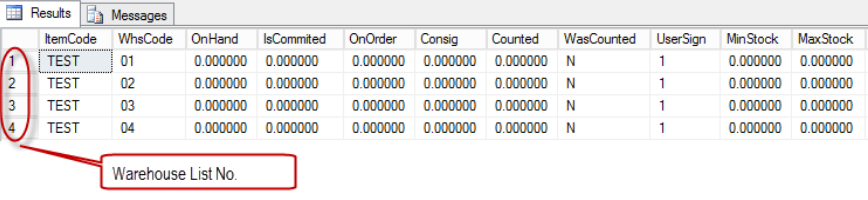
When you have both Active and Inactive Warehouses for the Item, you can use the following query:
SELECT * FROM OITW T0 inner join OWHS T1 on T0.WhsCode = T1 .WhsCode WHERE T0.ItemCode = ‘TEST’ And T1.Inactive = ‘N’ ORDER BY T0.WhsCode
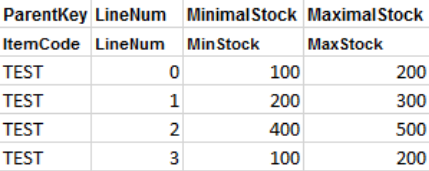
Example 1 :
You want to update “MinStock and MaxStock” for all the Warehouse.
The LineNum value for Warehouses will be:
Warehouse 01 : 1 – 1 = 0
Warehouse 02 : 2 – 1 = 1
Warehouse 03 : 3 – 1 = 2 and so on
The DTW template should be prepared as below.
Example2 :
You want to update “MinStock and MaxStock” only for one Warehouse (for example, 03) by DTW.
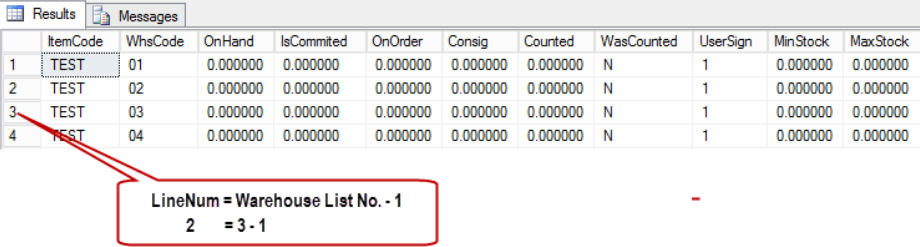
The template should be prepared as below based on the above query results.

Example3 :
You want to add a new Warehouse to the Items. The template should be prepared as below; all the existing records do not need to be mentioned in the template.

After importing the above template, the records available will be as below:
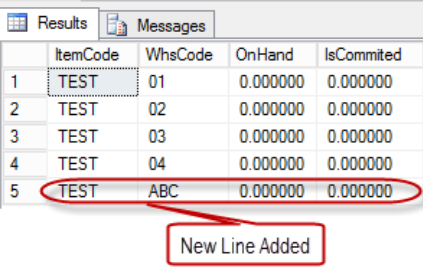
NOTE : If there is no Warehouse added for the Item in the Warehouse Info (OITW Table), then while adding the Warehouse to the Item, LineNum must start from 0 in the ItemWarehouseInfo template.
