

Trong quá trình hỗ trợ từ hãng SAP, trường hợp khách hàng cần gửi bản backup HANA database để team support thực hiện điều tra tìm ra lỗi.
Vui lòng xem chi tiết hướng dẫn ở SAP Note 1936989.
Bên dưới là bản rút gọn.
Symptom
SAP Business One Support requests a customer HANA database backup to investigate an issue in the SAP Business One.
Image/data in this SAP Note is from SAP internal systems, sample data, or demo systems. Any resemblance to real data is purely coincidental.
Solution
To enable SAP Business One support consultants to download, extract and restore customer SAP HANA database files only certain formats of SAP HANA database backup are supported.
In order to prevent any delays caused by transferring corrupt or non-supported backup files, carefully check the following points:
Schema Export
You have three options for performing a schema export. Choose only one method to proceed with the export:
- Schema export directly in System Landscape Directory (SLD).
- Schema export using export command.
- Schema export directly in SAP HANA studio.
The preferred method when uploading backups to Support is the first option.
Schema export directly in System Landscape Directory (SLD)
In order to use this method the SAP Business One Backup Service needs to be installed and configured. See SAP Business One Administrator’s Guide, version for SAP HANA for more details.
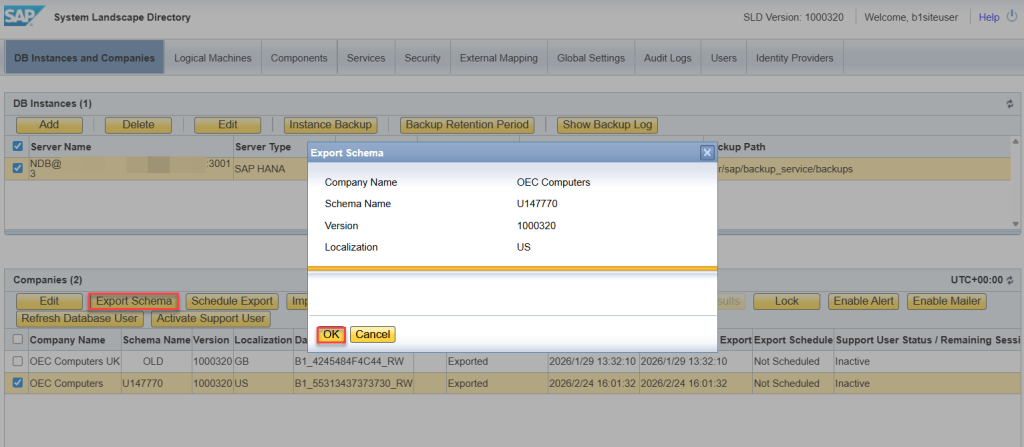
- In the System Landscape Directory, on the Servers and Companies tab, in the Servers section, select the server on which you want to perform export operations for a company schema.
- In the Companies section, select the company for which you want to perform export operations.
- Choose Export Schema.
- In the Export Schema window, choose OK.
Note:
If the company schema is being exported in the background or you have already started to import a schema to replace it, you will have to wait for the process to complete before you can choose OK.
Location of exported schema
On the Linux server, you can find the schema export at <Backup Location>/<Server_Port>/<SID>/<Schema Name>. The naming convention for the schema export is bck_<Timestamp>.
Depending on your setting during the installation of the backup service, the schema export may or may not be compressed in a zip file. The bck_actual symbol link points to the latest schema export.
If the schema Export is not compressed please follow the steps below in the section Compressing schema export.
