
Symptom
The Actual Product Cost is displayed in the Production Order window on the Summary tab. It represents the value of the received product quantity. The actual product cost is calculated as: Cost per component × Expected component quantity
The calculation of the expected component quantity is based on the value of completed products, which may be equal to or different from the value of the issued component quantity. If these two values differ, a production variance occurs. The expected component quantity is calculated as: Planned component quantity × (Actual product completed quantity / Planned product quantity)
Reproducing the Issue
You need to understand how product cost is calculated in different scenarios. This document provides three example scenarios for different valuation methods.
Resolution
Scenario 1 – No component quantity was issued:
- Production order contains:
Component item ‘C1’, planned quantity: 10, manual issue method,
Product item ‘P1’, planned quantity: 4. - Add a receipt from production with a quantity of 1.
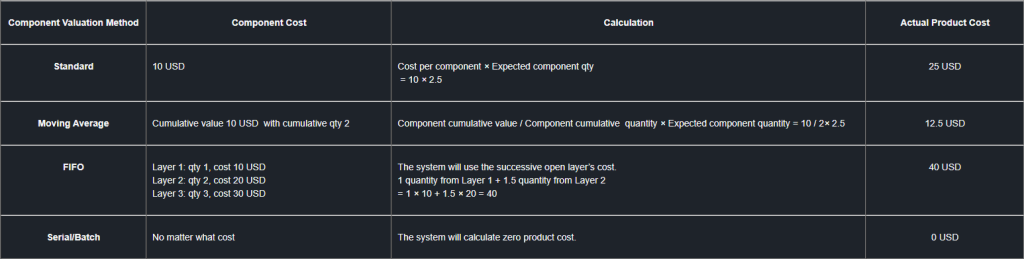
The system will first calculate the expected component quantity as 2.5 for component ‘C1’.
It is calculated as: Planned component quantity × (Actual parent completed quantity / Planned parent quantity) = 10 × (1 / 4) = 2.5
Based on the component valuation method, the actual product cost is calculated as follows:
Scenario 2 – Sufficient component quantity was issued:
If the user issued a sufficient amount or more component quantity than the expected component quantity, the system will determine the value of the components that were issued but not applied to previously received products.
Subsequently, this value will be used in the calculation of the product cost.
- Production order contains:
Product item ‘P1’, planned quantity: 4
Component item ‘C1’, planned quantity: 10, manual issue method
- Add an issue for production with a quantity of 6 for component ‘C1’.
- Add a receipt from production with a quantity of 2 for product ‘P1’.
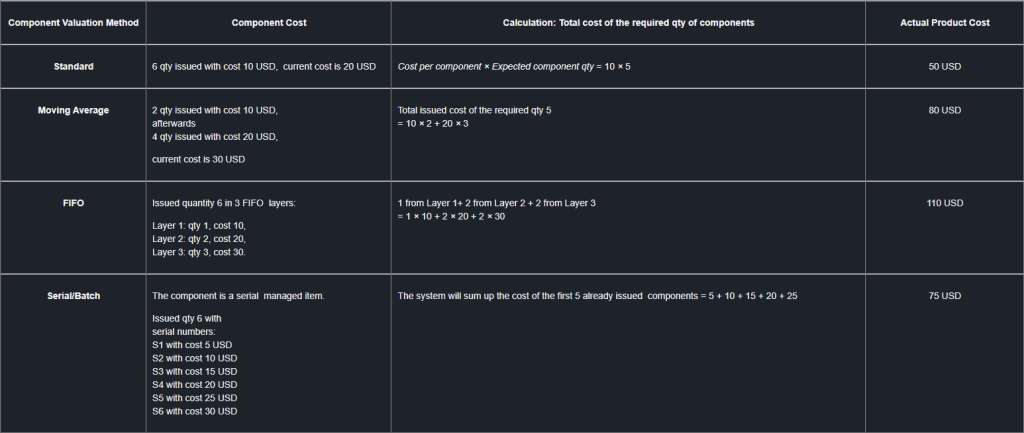
The system will first calculate the required quantity of component ‘C1’ as 5: Planned component quantity × (Actual parent completed quantity / Planned parent quantity) = 10 × (2 / 4) = 5.
Regardless of the current component cost, the actual product cost is calculated using the actual cost of the already issued components.
Between the Issue for Production and the Receipt from Production documents, other transactions involving the component may have been recorded. As a result, the component cost at the time of issue may differ from the cost at the time of receipt.”
Scenario 3 – insufficient component quantity was issued:
If the user issued a smaller quantity than the expected component quantity, the system will sum up the total issued component cost and the cost of the additional required component quantity.
- Production order contains:
Product item ‘P1’, planned quantity: 4
Component item ‘C1’, planned quantity: 10, manual issue method. - Add an issue for production with a quantity of 3 for component ‘C1’.
- Add a receipt from production with a quantity of 2 for product ‘P1’.
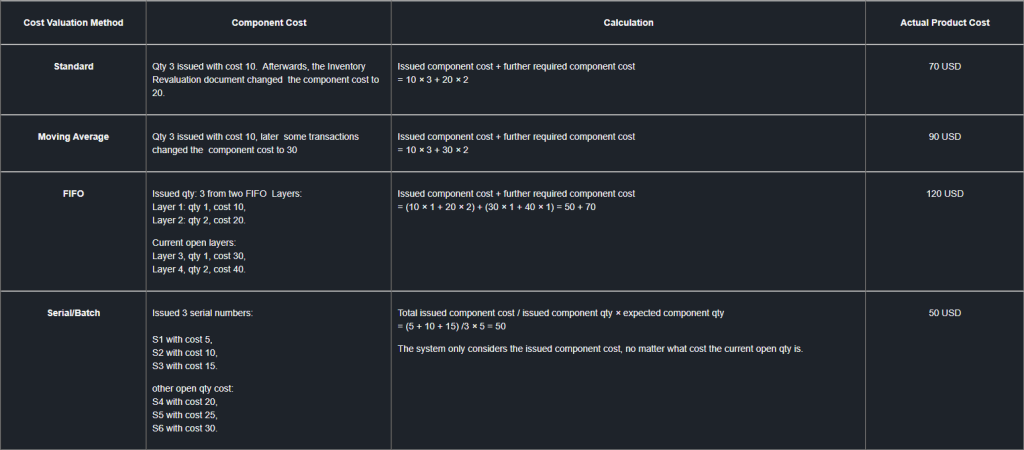
The system will first calculate the expected component quantity as 5 of component ‘C1’: Planned component quantity × (Actual parent completed quantity / Planned parent quantity) = 10 × (2 / 4) = 5.
The actual product cost is calculated as follows, based on the component valuation method:
In all of the above scenarios, if you issue additional components later while closing the production order, the actual product cost will be revalued based on the actual component cost.
This revaluation occurs only if the produced quantity is still available in the warehouse at the time of production order closure.
SAP Note 2962133 – Variance Calculation and Variance Report in Production Order – SAP for Me
